EN
EN

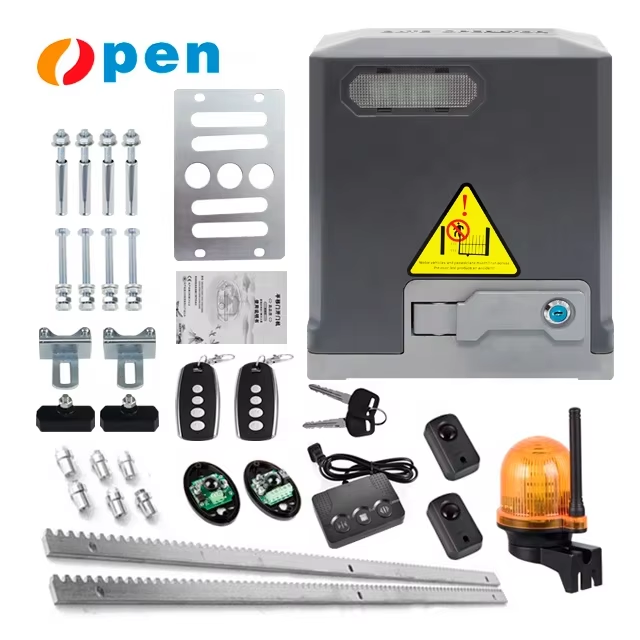
Power Supply Failures in Automatic Gate Opener Systems
Power supply disruptions are a leading cause of automatic gate opener failures, often stemming from grid instability or component wear. Addressing these issues promptly ensures uninterrupted access and security.
Diagnosing Outages, Tripped Breakers, and Faulty Wiring
First things first, check around town for any reported power outages. If there's one affecting your area, call the local utility company to get an idea when they expect things back online. Next up, take a good look at the circuit breaker box. Those little switches often trip after electrical surges or overloaded circuits. Reset them carefully but keep an eye on whether they pop again soon after. Sometimes the problem lies deeper in the system. Worn out wires with damaged insulation or connections that have come loose over time can lead to sporadic electrical failures throughout the house. Grab a multimeter and start testing voltages at key points in the system. Most residential setups should read around 110 volts, so anything significantly different means something needs attention. Don't forget regular inspections either. Looking for signs of corrosion or physical damage helps catch problems before they become serious hazards or expensive repairs. And remember, if these basic checks don't solve the mystery, it's always wise to bring in a licensed electrician who knows what to look for regarding proper grounding and insulation throughout the entire electrical network.
Solar Panel and Battery Backup Degradation in Off-Grid Automatic Gate Opener Installations
Solar panels and batteries form the backbone of most off grid systems, but they do wear down over time from things like sun exposure, changing temperatures, and buildup of dirt and grime. A good rule of thumb is to give those panels a thorough cleaning every three months or so. Dust and snow can really cut down on how much power gets generated when they block sunlight. Lead acid batteries tend to lose their punch as years go by. It's smart practice to check their voltage at least once per year while they're actually powering something. If any battery drops below 12 volts, it probably needs replacing. For backup power situations, aim for systems that can keep running between one and two days straight without sunlight. Charge controllers play a critical role too. Make sure they work properly because letting batteries discharge completely will shorten their life expectancy dramatically. When installing panels, find spots where shadows won't interfere much throughout the day. Also worth checking regularly are all the wires for signs of rodent chew marks. Taking care of these little details makes all the difference in keeping remote installations working reliably for years to come.
Wireless Control and Access Device Failures
Dead Batteries, Signal Interference, and Keypad/Remote Reprogramming Errors
Most problems with wireless controls on automatic gate openers usually come down to three main things: dead batteries, signal interference from the environment, or mistakes made while reprogramming. When batteries run out in remotes or keypads, the whole system stops talking - something basic folks often miss until they're stuck outside. Signals get messed up too by all sorts of stuff around them. The Wi-Fi router next door, big metal objects, even thick bushes can mess with how fast gates respond or stop working completely. Then there are those times people try to reset their remotes without following instructions properly. Skip a step here or there, mix up the order, and suddenly the gate won't open no matter what button gets pressed.
Key troubleshooting steps include:
- Testing remote batteries monthly and replacing them proactively
- Relocating gate receivers away from interference sources like electrical panels
- Verifying programming sequences using official manuals
- Resetting control boards before re-pairing devices
Signal dropouts may also indicate deeper RF module faults, such as frequency drift or sensitivity loss, though these require professional diagnosis. Consistent maintenance prevents 80% of wireless access failures, ensuring reliable operation.
Safety Sensor and Obstruction Detection Failures
Dirt Accumulation, Misalignment, and Wiring Disruptions Affecting Sensor Reliability
The safety sensors we rely on (usually infrared beams or photo eyes) stop gates from moving when something gets in the way, so they need to work reliably for proper safety standards. Most false alarms come from dirt building up on those little lenses, basically making the sensors miss actual dangers out there. When moisture gets inside or stuff builds up, it's time to gently wipe down those parts with microfiber cloths about every three months. Misaligned sensors often happen after ground shifts or when something bumps into them, creating dangerous blind spots where nothing gets detected. To fix this, most technicians use a laser level to get those beams back in line, keeping them parallel within about an eighth of an inch. Rodents chewing wires or corrosion problems can cause all sorts of electrical issues too. Check connections regularly for any frayed spots and run monthly tests on voltage continuity. In our experience, doing regular cleaning and adjustments fixes around 90% of sensor problems. But if the wiring itself is damaged, replacement becomes necessary fast because nobody wants to risk missing a real obstruction at the gate. Ignoring these basic maintenance points just invites trouble down the road.
Mechanical and Motor-Driven Operational Faults
Gate Stuck or Locked in Manual Mode: Limit Switch Calibration and Motor Strain Diagnosis
Automatic gates that get stuck or switch to manual mode need prompt attention to limit switches and motor parts. When these switches are out of alignment, they stop the gate from stopping properly, triggering a safety lockout that accounts for around 35 percent of all mechanical gate issues. Look out for signs that the motor is working too hard such as hot housing surfaces or strange humming noises, both pointing toward possible electrical problems or excessive strain on the motor. Check if the rails are straight and clear any debris blocking movement before adjusting the travel settings per what the manufacturer recommends. Should the gate still resist when operated manually after this, take the motor apart and check for anything causing friction within the drive system itself.
Noisy, Slow, or Jerky Motion: Lubrication Deficits, Gear Wear, and Environmental Impact on Automatic Gate Opener Performance
When machines start making grinding sounds, moving slowly, or jerking unexpectedly, it's usually a sign something mechanical has gone wrong somewhere. Not enough oil gets things worn down much quicker in drive chains and gearboxes. Systems that go without proper lubrication tend to break down around 60 percent faster compared to those regularly maintained. The friction between metal parts creates heat which can warp components over time and pulls in all sorts of tiny abrasive particles. Anyone working on equipment should check gear teeth for signs of rounding or chips forming, particularly during extreme seasons when temperatures change enough to affect how tight everything fits together. Different environments create different problems too. Humid conditions near coasts eat away at bearings pretty fast, whereas dry areas full of sand and dust get into seal mechanisms eventually. Regular maintenance matters a lot here. Aim for lubrication every three months with greases suitable for current temperatures, and maybe install some sort of cover protection if operating in really tough climates where weather is constantly beating against machinery.
FAQ Section
How can I identify if my automatic gate opener has power supply issues?
Power supply issues can be identified by checking for reported outages in your area, examining circuit breakers, and testing voltages with a multimeter. If these checks don't resolve the problem, consult a licensed electrician.
How often should solar panels and batteries be maintained?
Solar panels should be cleaned every three months, and lead acid batteries should be checked for voltage once a year. Ensuring charge controllers are functioning properly is essential to prevent battery degradation.
What are common causes of wireless control failures?
Common causes include dead batteries, signal interference from environmental factors, and errors during keypad or remote reprogramming. Ensure regular battery testing and consult manuals for proper reprogramming sequences.
How can I maintain safety sensors for reliable operation?
Safety sensors require regular cleaning every three months, alignment checks, and inspection of wiring for frayed spots. Regular maintenance can prevent most sensor issues.
What steps should I take if my gate gets stuck or moves slowly?
Inspect limit switches for alignment, check motor strain by observing for hot surfaces or unusual noises, and examine lubrication levels and gear wear. Regular maintenance can prevent these mechanical problems.
Table of Contents
- Power Supply Failures in Automatic Gate Opener Systems
- Wireless Control and Access Device Failures
- Safety Sensor and Obstruction Detection Failures
- Mechanical and Motor-Driven Operational Faults
-
FAQ Section
- How can I identify if my automatic gate opener has power supply issues?
- How often should solar panels and batteries be maintained?
- What are common causes of wireless control failures?
- How can I maintain safety sensors for reliable operation?
- What steps should I take if my gate gets stuck or moves slowly?